CMSs, E-Commerce Tools, & Website Builders Explained
A Beginner’s Guide to Choosing the Right Foundation
A beginner-friendly guide to WordPress, Shopify, Wix, Squarespace, Webflow, and choosing the right website platform.
Book Overview
Discover the easiest way to understand and compare today’s most powerful website building platforms. Whether you’re a business owner, freelancer, or aspiring developer, this guide reveals features, drawbacks, costs, and the restrictions of today's most popular website building platforms.
From popular CMSs like WordPress, Joomla, and Drupal to top e-commerce tools such as Shopify, WooCommerce, BigCommerce, and Magento. You’ll also explore leading website builders including Wix, Webflow, and more—learning how to choose the best foundation for your goals.
This book demystifies website building platforms by discovering:
- Why now is the time to build your business
- The differences between CMSs, e-commerce tools, and website builders
- How to choose the right platform for your project or business
- Essential performance and obstacles, explained in plain English
- The truth about AI powered site creation tools
- How and where AI is impacting jobs and industries
If you’ve ever wondered where to start or felt overwhelmed by endless options, this book makes it easy to understand the platform landscape. Learn how the tools of today power what we build. Your journey to pursuing your digital goals starts here.
Table of Contents
- Hosting
- The Basics
- Self Hosting
- cPanel
- Working with Hosts
- Content Management Systems (full chapter shown below)
- Headless CMS
- Backup Systems
- WordPress.org:
- The Basics
- Hosting
- User Experience
- Getting Started
- Customization
- Obstacles
- Plugins
- WordPress.com:
- Features
- Comparisons
- Drawbacks
- Self Hosting
- Conclusion
- Joomla:
- About
- Market Share
- Features
- Hosting
- Usage
- Conclusion
- Drupal:
- About
- Features
- Extensions
- Headless CMS
- Processing Power
- Hosting and Installation
- Ghost CMS:
- Features
- Granular Details
- Built for Writing
- Comparisons
- Speed
- Conclusion
- ECommerce Tools:
- Traffic
- Store Integration
- Alternatives
- Realistic Approach
- Shopify:
- Features
- Comparisons
- Selling Points
- Drawbacks
- Conclusion
- BigCommerce:
- Features
- Drawbacks
- Comparisons
- Conclusion
- WooCommerce:
- Strengths
- Caveats
- Drawbacks
- Comparisons
- Magento:
- Features
- Usages
- Comparisons
- The Future of Magento
- Conclusion
- Website Builders:
- Benefits
- Drawbacks
- Wix:
- Features
- Usage
- Drawbacks
- Conclusion
- Weebly:
- Features
- Usage
- Drawbacks
- Conclusion
- Squarespace:
- Features
- Usage
- Drawbacks
- Conclusion
- Hostinger Website Builder:
- Features
- Usage
- Drawbacks
- Comparison
- Conclusion
- Webflow:
- Features
- Usage
- Drawbacks
- Conclusion
- Performance
- Creating a Website with AI
- Further Reading
- Author's Note
- About the Author
Frequently Asked Questions
Content Management Systems
Let me begin by saying, explaining anything technical is complex. There’s an innumerable amount of moving parts, dense ecosystems of code, and multi-layered, intertwined concepts. In turn, it would literally be impossible to explain every single facet of content management systems (CMS) in a book.
My goal is to introduce you to these technologies—conceptually; and thus provide examples of industry leading companies who provide thereof.
In the simplest terms, a CMS is software that manages content. CMSs typically remove the need to hire a developer by allowing users to do a wide array of tasks efficiently. Common CMS features include but are not limited to:
- Blog post management
- Dashboards for a birds eye view of content
- Imagery maintenance
- Page and video management
- Frontend customization via themes
- Elimination of database tasks
- Linking tools
- Component Integration
- Feature extensions with plugins
- ECommerce
- Intricate navigation creation
- Administration section
- User role assignment and restrictions
People use CMSs for unique purposes other than the aforementioned. I’ve used a CMS in conjunction with a fully developed website to only handle blog posts.
It’s also common to use a CMS solely for e-commerce—also in tandem to a fully developed website made from scratch. That’s the thing with modern technologies. They can often be used in numerous ways to fit specific needs and goals.
The most important aspect is to plan ahead just like building anything else. No one wants to rebuild, spend unnecessary time and money doing what should’ve been done in the first place. Even if the mindset is to get online as quickly as possible.
Plan, discuss, and play your own devil’s advocate until you arrive at the best possible method of how to create and maintain a website. Always think for the long term. Think and plan for sustainability.
If you’re not sure or simply inexperienced, post questions in a relative forum such as Stack Overflow. Utilize an AI tool. Do whatever you can in advance to ensure the direction you’re moving in is a solid choice for the long term.
Even if you don’t have everything developed yet, laying the proper foundation may save you literally hundreds of hours and perhaps thousands of dollars.
Moreover, businesses change. Products evolve, and the people working on applications may come and go. Applying an advanced concept should be consideration to isolate sections of your website.
Micro services is a technical term meaning—small services, or micro applications. Bite sized applications that do very specific things in their own environments.
Think of a financial application with checking, savings, investment tools, customer service, login abilities, and home or business loans. Monstrous websites like these don’t have all these services in one huge page of code.
They’re split up into independently running web applications communicating with one another. Small enough to maintain without minor modifications having large, unexpected results. All of these micro services come together, making them look like one single website.
Headless CMS
If you have the need for a specific CMS use, integrate it in this conceptual manner. Such as the case with a headless CMS. Headless CMSs are missing their head—or the UI (user interface), AKA…the frontend—what users see in the browser.
Headless CMSs are APIs. APIs are everywhere and everyone uses them most likely dozens of times over the course of a typical day on the internet.
- Purchasing a product on Amazon requires an API to process your payment
- Logging into a website via Google requires an API to connect to Google
- Adding a comment on Yelp requires an API to connect to its database
- Uploading a video to Instagram requires an API
- Creating a standalone UI that populates its content from a headless CMS is a frontend with an API—two services communicating
The most important aspect to know involving CMSs, is that their fabulously flexible. In fact, many of the big companies I’ve worked at used proprietary CMSs.
Whether it’s a big name brand or a custom built CMS, the concept of maintaining all of a websites content with a graphical user interface (GUI) to easily manage pages and users’ experience is a popular and sustainable method. Let’s move on to actual CMSs vs theory.
Backup Systems
I’ve never experienced a CMS site that was hacked probably because I use backup systems and security scans. Do note, in order for CMSs to be user friendly and possess the amount of features and options and subscriptions and tools they do—they require extraordinary amounts of complex operations under the hood.
None of which users should be managing independently. So, if you think you can simply install and host a CMS with zero security precautions, you are exponentially increasing the likelihood of running into problems.
Backup systems are akin to vehicles with 4x4—some 4 wheel drive systems will get you out of dense mud or sand pits while others are just for show. In the world of CMSs, scam culture, and heightened digital attacks, you want a reputable 4 wheel drive system to detect and deflect people and code that’s not supposed to be in your system.
Good systems illustrate how many attempted logins have occurred. How many user names were blocked and even the passwords that were attempted which are undoubtedly emanating from dictionary attacks.
Dictionary attacks are systems that run through dictionary words trying to repeatedly and automatically guess passwords chipping away at one character at a time. Dictionary attacks are why password generators provide alpha numeric passwords mixed with special characters—strings that are not dictionary based and have zero patterns.
Another facet of good backup systems are the ability to block users geographically. Places in China, areas of Russia, and select countries in the Middle East for instance are always appearing in my list of locations of said login attempts.
In turn, users can be blocked from these select locations. I’ve even gone so far as to check my analytics for dedicated viewers in these countries/ cities deciphering as to whether they’re reading content or bouncing around.
Additionally, backup systems will even show the content or directories visitors are accessing. If users are tinkering with files associated with login—it’s a bad actor.
In this case, hardening can be applied to vulnerable directories which is a one click process that applies an onslaught of powerful security measures to select directories.
Different CMSs will have inbuilt or extraneous methods of backing up sites and security measures. There’s simply too many to explain, but ensure you’re utilizing a reliable method.
Enjoying the Free Chapter?
Continue with the guide covering numerous platforms—benefits, drawbacks, comparisons, and real world examples.
Get the Full GuideWordpress.org (Wordpress CMS)
No introduction to CMSs would be complete without Wordpress. Whether it’s this version or that version of WP, it’s a powerful and highly popular way to build two types of websites. In this chapter, we’ll talk about one of them.
Wordpress.org provides free CMS software. The same software that’s used by many millions of websites throughout the entire internet. I’ve read multiple estimates in regards to how many. Of which range from 50-65% of the websites on the surface web—equating to as many as 465 million websites.
Whatever the exact number is, WP websites are in the hundreds of millions—and that high…for a good reason. I’ve used it many times for different websites, extensions to non CMS sites, and I’ve even integrated the blogging engine alone into non CMS websites.
It’s massively malleable and incredibly useful for virtually all types of companies and industries.
Continues for a total of over 2,000 words.
Wordpress.com
For those of you looking to skip the self hosting aspect of a CMS, Wordpress.com is the way to go. This fully hosted website platform is run by Automattic. A profound, billion dollar company you’ve likely never heard of.
This version of WP handles hosting, setup, security, and maintenance for you. It’s the plug and play version of WP where you create an account, pick a plan, and begin building your website without the need to deal with server stuff or installation.
The key features here are hosting—included. This also handles backups. This alone can be very attractive as hosting is often daunting for some. There’s powerful website builder tools such as a drag and drop editor, dozens of free themes, and the ability to do an array of things without code. But you can code with different plans.
Continues for a total of nearly 1,100 words.
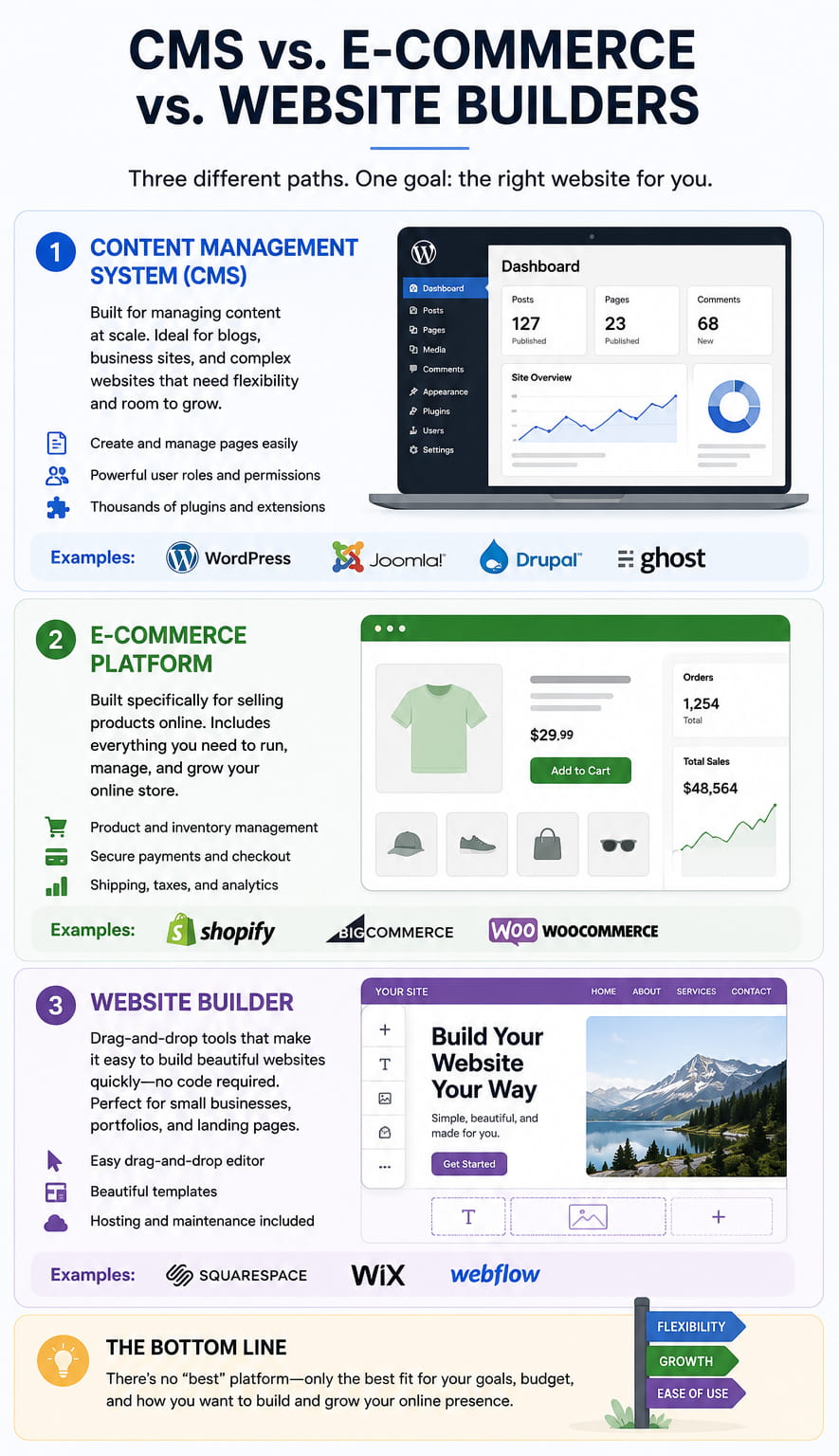
What is a Content Management System CMS?
Understanding Content Management Systems (CMS)
A Content Management System, or CMS, is a software application that allows users to create, manage, and modify content on a website without needing specialized technical knowledge. In simpler terms, it is a tool that helps you build a website without having to write all the code from scratch—or even know how to code at all.
Instead of interacting directly with HTML, CSS, and server-side languages, you use a user-friendly interface (often called a dashboard) to handle the "front-end" look and the "back-end" data of your site. Here are the core components that make a CMS work:
- Content Management Application (CMA): This is the user interface that allows you to add and manage content on your site. If you have ever written a blog post in a text editor and hit "publish," you have used a CMA.
- Content Delivery Application (CDA): This is the backend, invisible process that takes the content you entered into the CMA, stores it properly, and makes it visible to your website visitors.
- Database Management: A CMS stores your text, images, and layout settings in a database, fetching them instantly whenever a user types in your URL.
- Extensibility: Most modern systems allow for plugins or modules that add features like contact forms, SEO tools, or e-commerce storefronts without requiring custom programming.
By using a CMS, businesses can maintain a dynamic web presence where multiple team members can collaborate on updates simultaneously, ensuring the site stays fresh and relevant for users.
To learn more about how different systems compare and which might be right for your project, visit this resource:
A Comprehensive Guide to CMS Architecture and BenefitsSquarespace—How Much Does it Cost?
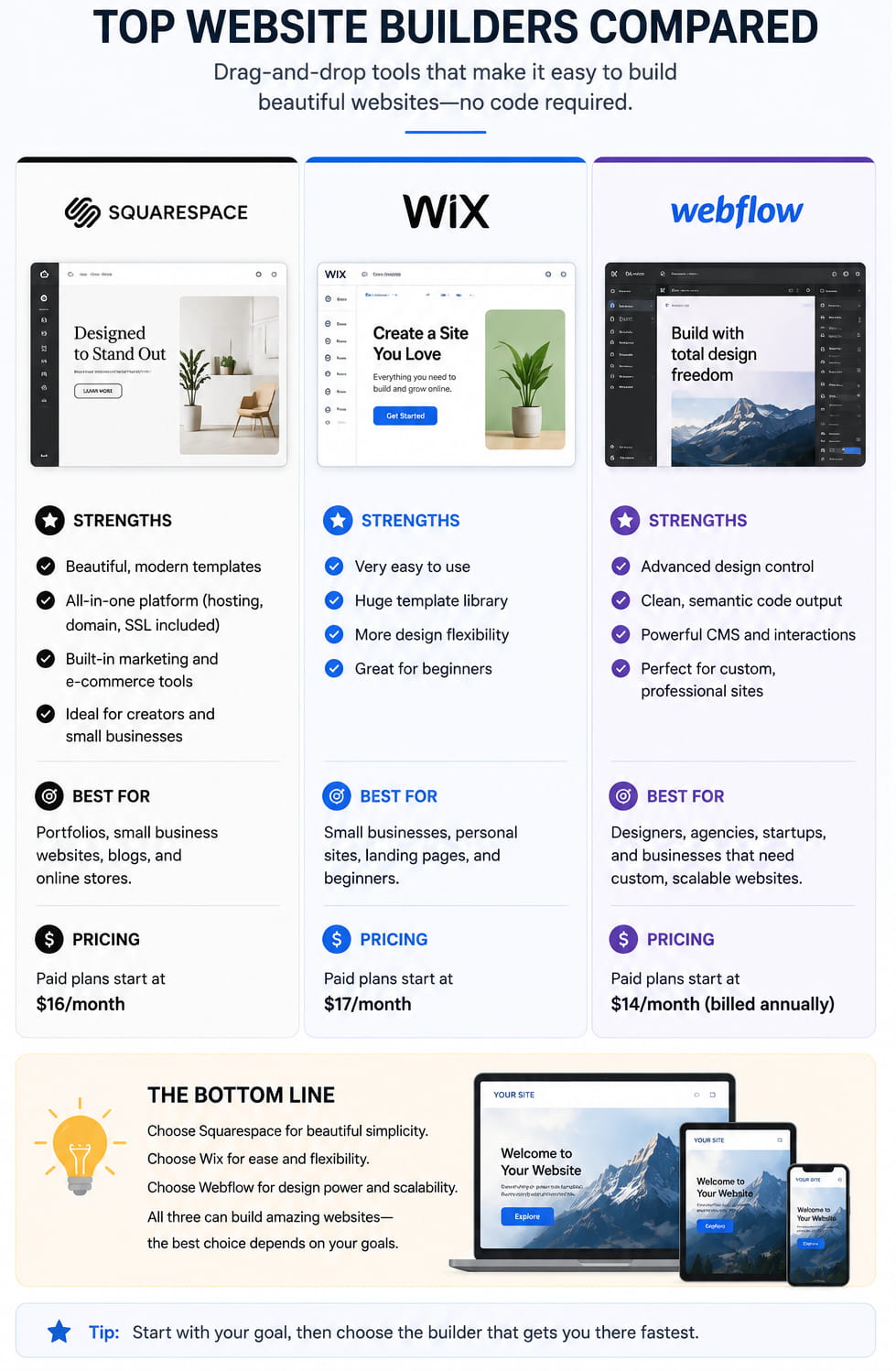
Squarespace is a premium, all-in-one website builder known for its design-centric templates and integrated hosting. Unlike open-source platforms, Squarespace simplifies the technical side of things by bundling security, updates, and design tools into a single monthly or annual subscription fee. In 2026, the platform continues to offer tiered pricing to suit everything from personal portfolios to large-scale retail operations.
The cost of your site depends heavily on your billing cycle. Opting for annual billing typically saves you about 30% or more compared to paying month-to-month. Here is a breakdown of the standard 2026 pricing tiers:
- Basic Plan: Priced at $16 per month (billed annually) or $25 month-to-month. This is the entry-level tier for personal sites and portfolios. It includes a free custom domain for the first year but lacks advanced marketing and ecommerce features.
- Core Plan: Priced at $23 per month (billed annually) or $36 month-to-month. This is the most popular choice for small businesses, as it removes the 2% transaction fee found on the Basic plan and adds professional features like custom code access and promotional pop-ups.
- Plus Plan: Priced at $39 per month (billed annually) or $56 month-to-month. This tier is built for growing online stores. It offers lower processing rates for digital products and unlocks advanced merchandising tools and customer accounts.
- Advanced Plan: Priced at $99 per month (billed annually) or $139 month-to-month. Designed for high-volume sellers, this plan provides the most robust features, including abandoned cart recovery, advanced shipping calculations, and unlimited video storage.
When budgeting, also consider additional costs like domain renewals after the first year (usually $20–$70/year) and professional email through Google Workspace, which typically costs $6–$12 per user per month. For a complete comparison of every feature included in these plans, you can visit the resource below:
Official Squarespace Pricing and Plan ComparisonWhich is Better? Squarespace or Wix?
Squarespace and Wix are both popular website builders, but they are better suited for different types of users. Squarespace is usually the stronger choice for people who want a polished, professional-looking website with less setup work. Its templates are clean, modern, and consistent, making it a good fit for portfolios, restaurants, photographers, consultants, writers, and small service businesses that care about visual presentation.
Wix offers more flexibility. It gives users greater control over layout, design elements, apps, and page structure. This can be useful for small businesses that want more customization without hiring a developer. However, that flexibility can also make Wix feel messier if the site is not planned carefully. It is easier to over-design a Wix site or create pages that feel inconsistent.
In simple terms, Squarespace is better if you want a cleaner, more curated design experience. Wix is better if you want more control and are comfortable making more decisions. For most users who want a simple, elegant business website, Squarespace is often the better starting point. For users who need more layout freedom, niche features, or heavier customization, Wix may be the better choice.
What is Webflow?
Webflow is a visual website design and development platform that lets users build responsive websites without writing traditional front-end code by hand. It is popular with designers, agencies, startups, and businesses that want more creative control than a basic website builder provides. Webflow combines visual design tools, hosting, CMS features, animations, forms, and publishing tools in one platform.
The biggest advantage of Webflow is design freedom. Users can create highly customized layouts without being locked into rigid templates. Its CMS also allows structured content such as blog posts, case studies, team members, products, resources, or portfolio items. This makes Webflow useful for marketing sites, landing pages, portfolios, and content-driven business websites.
However, Webflow has a learning curve. It is easier than hand-coding everything, but it still requires an understanding of layout, spacing, responsiveness, and web structure. It is usually better for people who care about custom design and are willing to learn the tool.
Learn more from Webflow: Webflow CMS overview.
What is Joomla?
Joomla is a free, open-source content management system used to build websites and online applications. It sits between simpler website builders and more developer-heavy systems like Drupal. Joomla gives users more control than many drag-and-drop website builders, while still providing an admin interface for managing pages, menus, users, templates, extensions, and content.
Joomla can be a good fit for organizations that need structured content, user permissions, multilingual support, or more flexibility than a basic hosted website builder. It has a long history, an active community, and a large ecosystem of templates and extensions.
The downside is that Joomla requires more setup and maintenance than platforms like Wix, Squarespace, or Shopify. You usually need hosting, updates, security awareness, and some comfort working with CMS settings. It can be powerful, but it is not always the easiest choice for beginners.
Learn more from Joomla: Joomla official website.
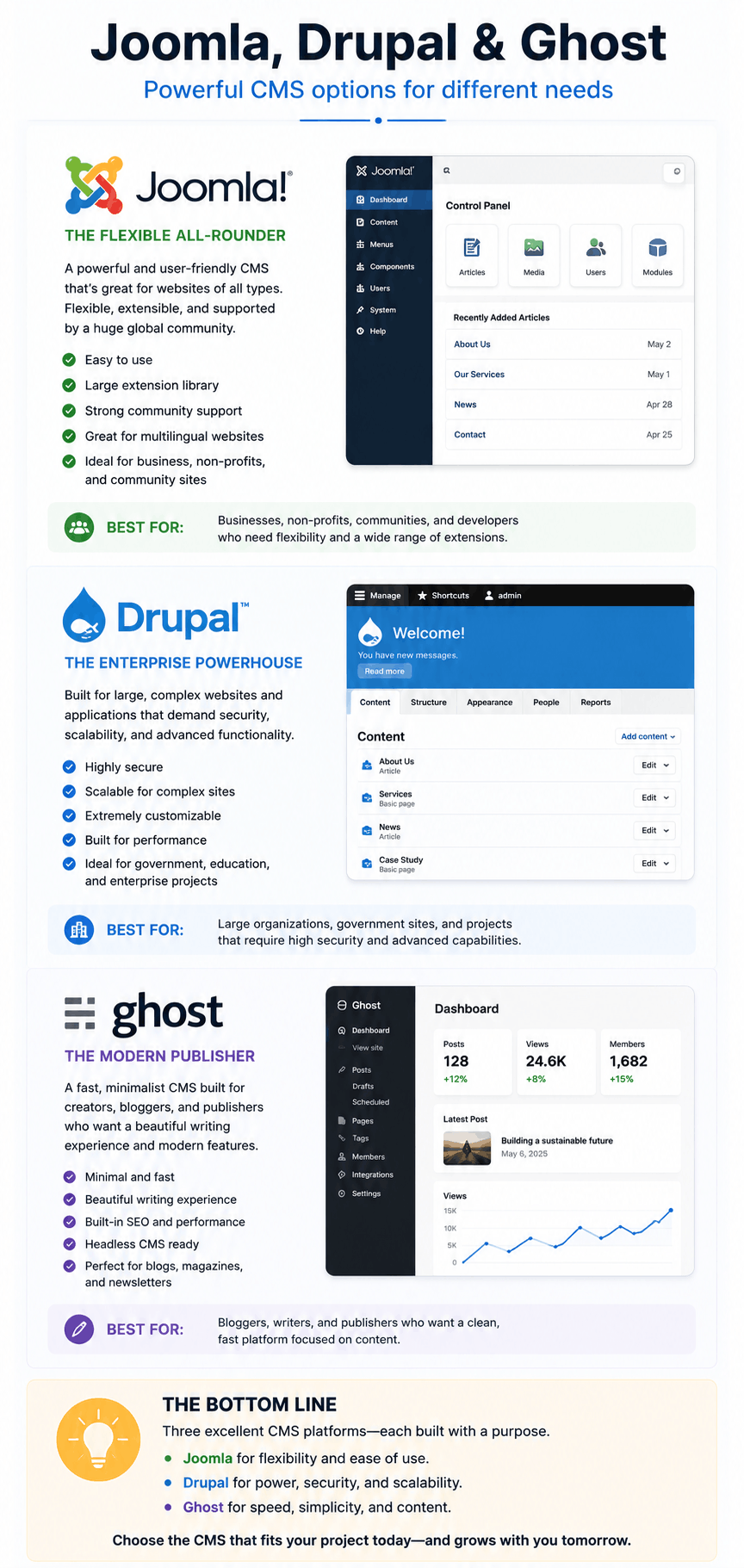
What is Drupal?
Drupal is a powerful open-source content management system known for flexibility, structured content, security, and scalability. It is often used by universities, government agencies, nonprofits, enterprise organizations, and websites that require complex content models or advanced permissions.
Drupal is not just a simple page editor. It is closer to a content framework, meaning it can support custom content types, taxonomies, user roles, workflows, multilingual publishing, APIs, and large-scale site architecture. For organizations with complicated digital requirements, Drupal can be an excellent choice.
The tradeoff is complexity. Drupal usually requires experienced developers or a technical team. It is not the best option for someone who simply needs a quick small business website or basic portfolio. But for complex, long-term, highly structured web platforms, Drupal remains one of the strongest CMS options available.
Learn more from Drupal: About Drupal.
Considering Ghost CMS?
Ghost is an open-source publishing platform built for writers, newsletters, blogs, memberships, and independent media brands. Unlike broader website builders, Ghost focuses heavily on publishing content, growing an audience, and monetizing through subscriptions or paid memberships.
Ghost can be a strong choice if your main goal is writing, blogging, newsletter publishing, or building a reader-supported publication. It includes publishing tools, email newsletter features, membership options, and a clean writing experience. This makes it attractive for authors, journalists, creators, and niche media projects.
Ghost is less ideal if you need a highly customized business website, complex e-commerce store, or advanced visual page builder. It is focused and elegant, but not as flexible as WordPress, Drupal, or Webflow for broader website needs. Choose Ghost if publishing is the core of your website.
Learn more from Ghost: Ghost publishing platform.
Pros and Cons of BigCommerce
BigCommerce is an e-commerce platform built for selling products online. It is often compared with Shopify because both provide hosted commerce tools, payment integrations, product management, themes, and online store features. BigCommerce is especially appealing to businesses that want strong built-in e-commerce functionality and room to scale.
Pros of BigCommerce
- Strong e-commerce features out of the box.
- Good scalability for growing stores.
- Flexible product, catalog, and selling options.
- Useful for businesses that want a serious online store without building from scratch.
Cons of BigCommerce
- Can feel more complex than simpler website builders.
- Design customization may require technical help.
- Costs can grow as the business needs more advanced features.
- Not ideal for non-commerce websites.
Learn more from BigCommerce: BigCommerce platform overview.
Who Owns Shopify, and Why Would Someone Use It?
Shopify is a publicly traded Canadian commerce company. It was co-founded by Tobias Lütke, Daniel Weinand, and Scott Lake, and Tobias Lütke continues to serve as Shopify’s CEO. Shopify is one of the most widely used platforms for creating online stores because it gives businesses a complete system for selling products online and in person.
Someone might use Shopify because it handles many difficult parts of e-commerce in one place: product pages, checkout, payment processing, inventory, shipping tools, themes, apps, analytics, and integrations. For a small business, this can be far easier than building a custom store from scratch.
Shopify is best for people who are serious about selling products. It is not always the best choice for a simple informational website, portfolio, or blog. But for e-commerce, especially when a business wants reliable checkout and room to grow, Shopify is one of the strongest options.
Learn more from Shopify: About Shopify.
Should I Use a Website Builder?
A website builder can be a smart choice if you need a professional website quickly and do not want to manage code, hosting, security, plugins, or custom development. Website builders usually include templates, visual editing tools, hosting, forms, basic SEO settings, and publishing features in one platform.
Website builders are often a good fit for small businesses, restaurants, consultants, creators, portfolios, event pages, simple blogs, and service websites. They reduce technical friction and allow non-developers to launch and update their own sites.
However, a website builder is not always the best long-term choice. If you need complex functionality, custom workflows, advanced performance control, unusual integrations, or full ownership of your technical stack, a CMS or custom-built website may be better.
In simple terms, use a website builder if speed, simplicity, and ease of maintenance matter most. Consider a CMS or custom solution if flexibility, scale, and control matter more.
Learn more from Wix: What is a website builder?
Want to see a real project example? View the Angular project sample .
5 Things to Know About ECommerce Tools
In the modern digital landscape, ecommerce tools are the backbone of any successful online business. Whether you are a small boutique owner or managing a large-scale enterprise, the software you choose dictates your operational efficiency and customer experience. Understanding the nuances of these tools is essential for sustainable growth.
- Scalability is Mandatory: One of the most critical aspects of an ecommerce tool is its ability to grow with your business. A platform that works for ten orders a day might crash or become prohibitively expensive when you scale to a thousand. Look for tools that offer tiered features and robust infrastructure to handle seasonal traffic spikes without compromising site speed.
- Integration Capability: No ecommerce tool exists in a vacuum. Your storefront needs to communicate seamlessly with your inventory management system, email marketing software, and shipping providers. Choosing tools with open APIs or a wide library of native integrations prevents data silos and reduces the manual labor required to sync information across different departments.
- Mobile-First Design: With a significant portion of global web traffic coming from mobile devices, your ecommerce tools must prioritize mobile responsiveness. This goes beyond just a "mobile-friendly" layout; it involves mobile-optimized checkout processes, fast loading times on cellular data, and support for digital wallets like Apple Pay and Google Pay to reduce friction.
- Data Security and Compliance: Handling customer data and financial transactions carries immense responsibility. Ecommerce tools must be PCI-DSS compliant and offer robust security features like SSL certificates and two-factor authentication. Failing to prioritize security not only risks your customers' data but can also lead to legal repercussions and the permanent loss of brand trust.
- Analytics and Reporting: You cannot improve what you do not measure. High-quality ecommerce tools provide deep insights into customer behavior, conversion rates, and average order value. Advanced reporting helps identify which marketing channels are driving the most profit and where customers are dropping off in the sales funnel, allowing for data-driven optimizations.
Ultimately, the right suite of ecommerce tools simplifies the complexity of online selling. By focusing on integration, security, and scalability, merchants can create a seamless shopping journey that keeps customers coming back while keeping backend operations organized and efficient.
Wix vs WordPress
Choosing between WordPress and Wix in 2026 comes down to a trade-off between total control and curated convenience. While both can build stunning sites, their underlying philosophies cater to different users.
Wix: The Visual Specialist
Wix is a "drag-and-drop" website builder. It is a closed ecosystem where hosting, security, and updates are managed for you.
- Ease of Use: Highly beginner-friendly. Its visual editor lets you move elements pixel-by-pixel, and its AI-driven design tools can generate a functional site in minutes.
- Maintenance: Hands-off. You don’t need to worry about server updates or manual backups.
- Limitations: Once you pick a template, you can’t easily switch to a new one without rebuilding. You are also limited to the apps available in the Wix App Market.
WordPress: The Open Powerhouse (Wordpress CMS)
WordPress is an open-source Content Management System (CMS). It requires you to provide your own hosting and handle your own maintenance.
- Flexibility: Virtually limitless. With over 60,000 plugins and 30,000 themes, you can build anything from a simple blog to a massive enterprise marketplace.
- SEO & Growth: WordPress remains the industry gold standard for SEO. It offers granular control over technical data that Wix’s "all-in-one" approach sometimes simplifies.
- The Catch: There is a steeper learning curve. You are responsible for security updates and compatibility checks between plugins.
| Feature | Wix | Wordpress |
|---|---|---|
| SetUp | Fast (minutes) | Moderate (hours/ days) |
| Control | Locked-in ecosystem | Full ownership of code |
| Pricing | Predictable monthly fees | Variable hosting + plugins |
| Support | 24/7 Direct Support | Community forums/ Developers |
The Verdict: Choose Wix if you want a professional site quickly without touching a line of code. Choose WordPress if you want a future-proof site that you can scale and customize without restrictions.
Looking to build your own site? Explore web development services